Verdict first: You can build a real, working sales funnel for $0 — and I did, start to finish, in about 30 minutes on Systeme.io's free plan. This guide is that exact build, step by step, with the screenshots and the two places it actually tripped me up. The free plan covers a landing page, a funnel, an email list and a 3-email follow-up sequence; you do not need a credit card. The catch is not the price, it's two defaults: templates publish with demo text still in them, and free-mail senders (Gmail/Yahoo) are blocked by the platform. Both are fixable in minutes once you know about them.
Who this is for: solopreneurs, coaches, newsletter writers and side-hustlers who need one funnel to collect emails or sell a first small product — and who would rather not pay $97/month to find out if the idea works.
Who this is not for: anyone who needs split-testing at scale, complex multi-branch automation, or a large webinar funnel. Free-tier funnel builders are for validating an offer, not for running a mature business — I say exactly where the ceiling is at the bottom.
What you will have at the end
The funnel below is the one I actually built and tested. It is deliberately boring, because boring funnels convert:
Traffic (social post / blog / email)
  └── Opt-in page  ──►  collects name + email
        └── Thank-you page  ──►  delivers the download
              └── Automation rule  ──►  subscribes them to a campaign
                    └── Email 1 (instant, with the PDF attached)
                        Email 2 (+1 day)
                        Email 3 (+3 days, first soft pitch)
Two steps, one automation rule, three emails. That is the entire machine. Everything else in funnel-building is decoration you can add later.
What "free" actually gets you
| Free-plan limit | What it means in practice |
|---|---|
| 2,000 contacts | Enough for a validated offer. You will outgrow it before you outgrow the plan. |
| 3 funnels | Plenty — most people need one funnel plus a spare. |
| 1 custom domain | Use it. It materially helps deliverability (see the Gmail/Yahoo gotcha below). |
| Unlimited emails | Not metered. No "you've hit your send limit" wall on the free tier. |
| No credit card | The free plan is a real tier, not a 14-day trial. |
Paid tiers start at $17/mo (Startup: 5,000 contacts, 10 funnels) and go up to $47/mo (Webinar) and $97/mo (Unlimited). You do not need any of them to finish this guide.
Step 1 — Decide what the funnel is for
Pick exactly one of these before you touch the builder. This is the step people skip, and it is the reason most "my funnel doesn't convert" problems are actually positioning problems:
- Lead magnet funnel — you give away a checklist, template or PDF in exchange for an email. Two steps. This is what I built. Start here.
- Free-trial / demo funnel — sign-up page, then onboarding.
- Small-product funnel — opt-in → sales page → checkout.
Write the offer in one sentence first: "I help [who] get [result] with [deliverable]." If you cannot fill that in, more funnel steps will not help.
Step 2 — Create the funnel and pick a template
Inside Systeme.io: Funnels → Create → Landing Page, then choose a lead-magnet style template.
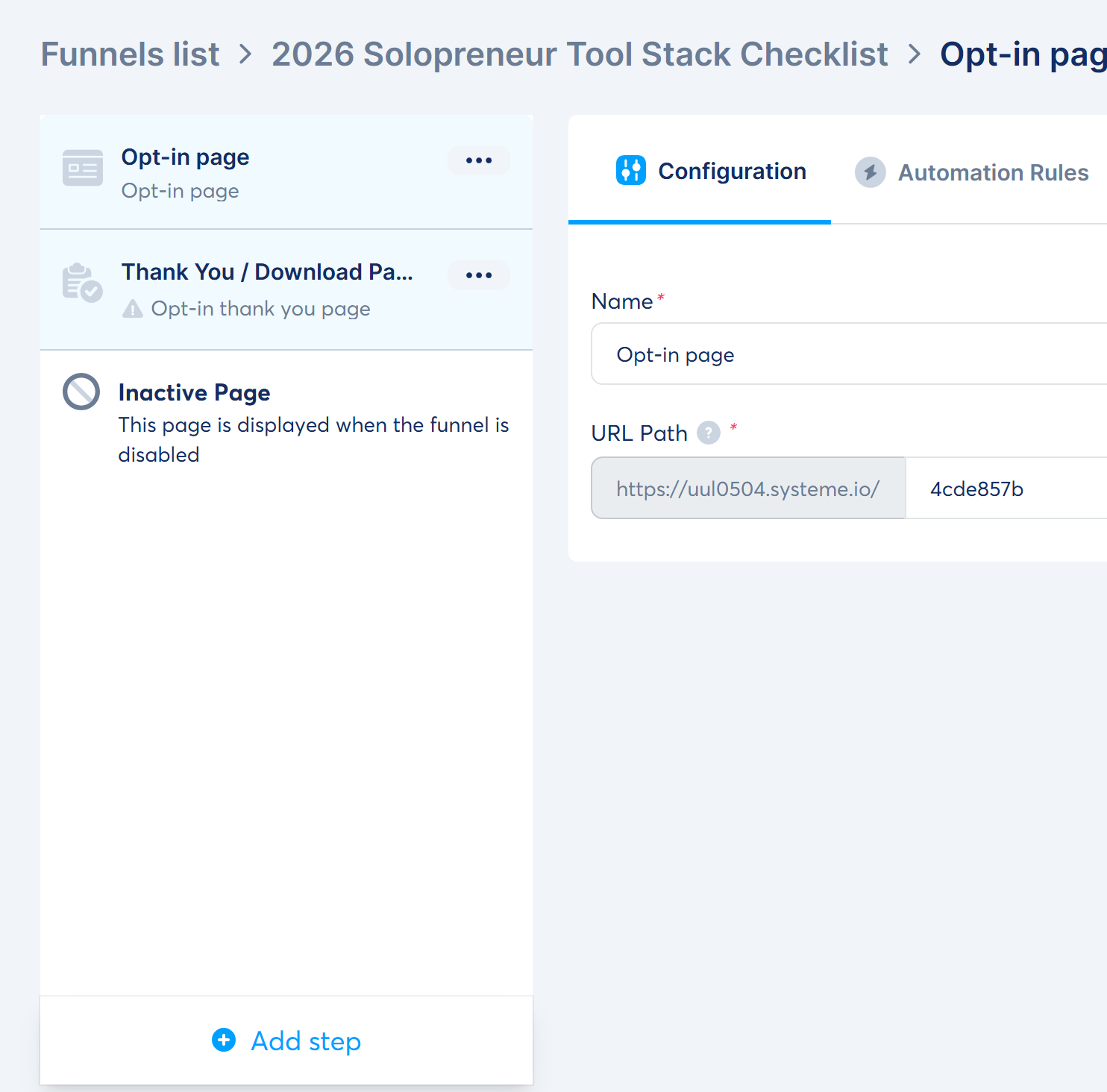
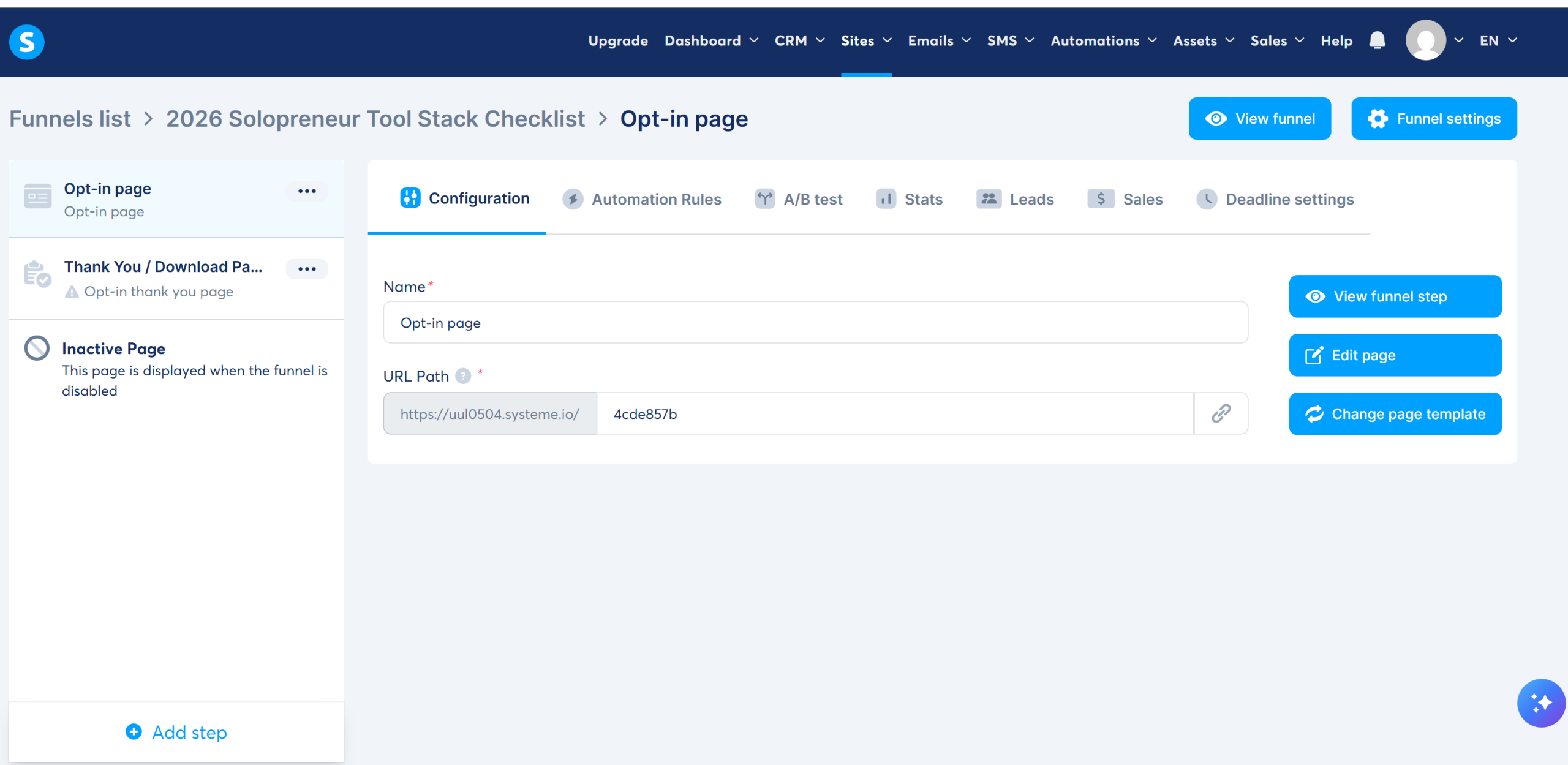
Honest note on the UI: if you learned funnel-building from older tutorials you are expecting a canvas with arrows. You will not get one. The 2026 interface shows a clean vertical step list. The opt-in template creates two steps by default — Opt-in page → Thank-you / Download page. That is correct for a lead magnet; the "3-step funnel" you have read about needs a sales page you add manually.
Step 3 — Replace the template's demo content (do not skip this)
This is the mistake I actually made, and it is the most embarrassing one in the whole process.
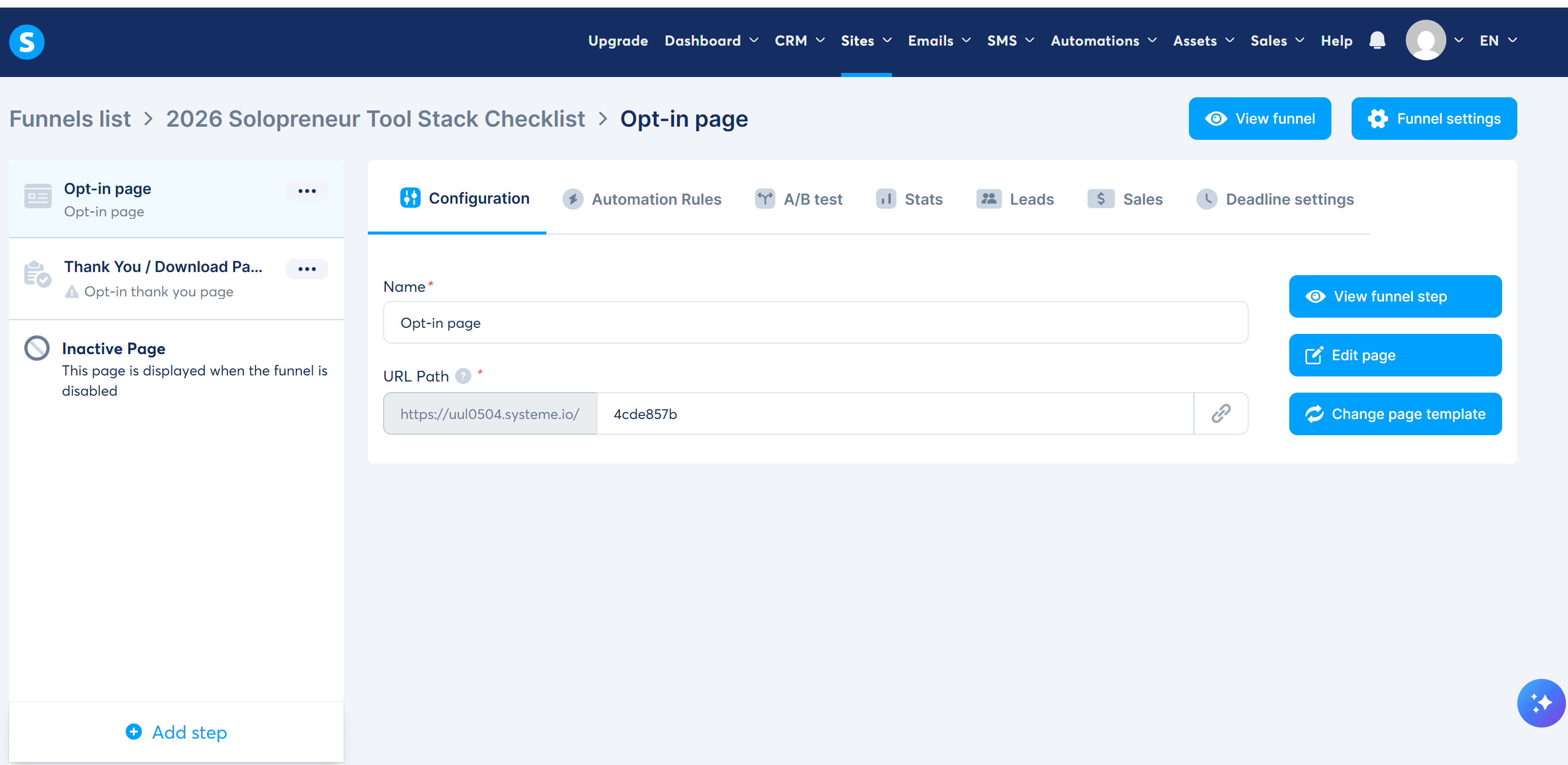
Step configuration is where you set the page name and the URL path. Once you publish, you have a live URL — mine was https://uul0504.systeme.io/4cde857b.
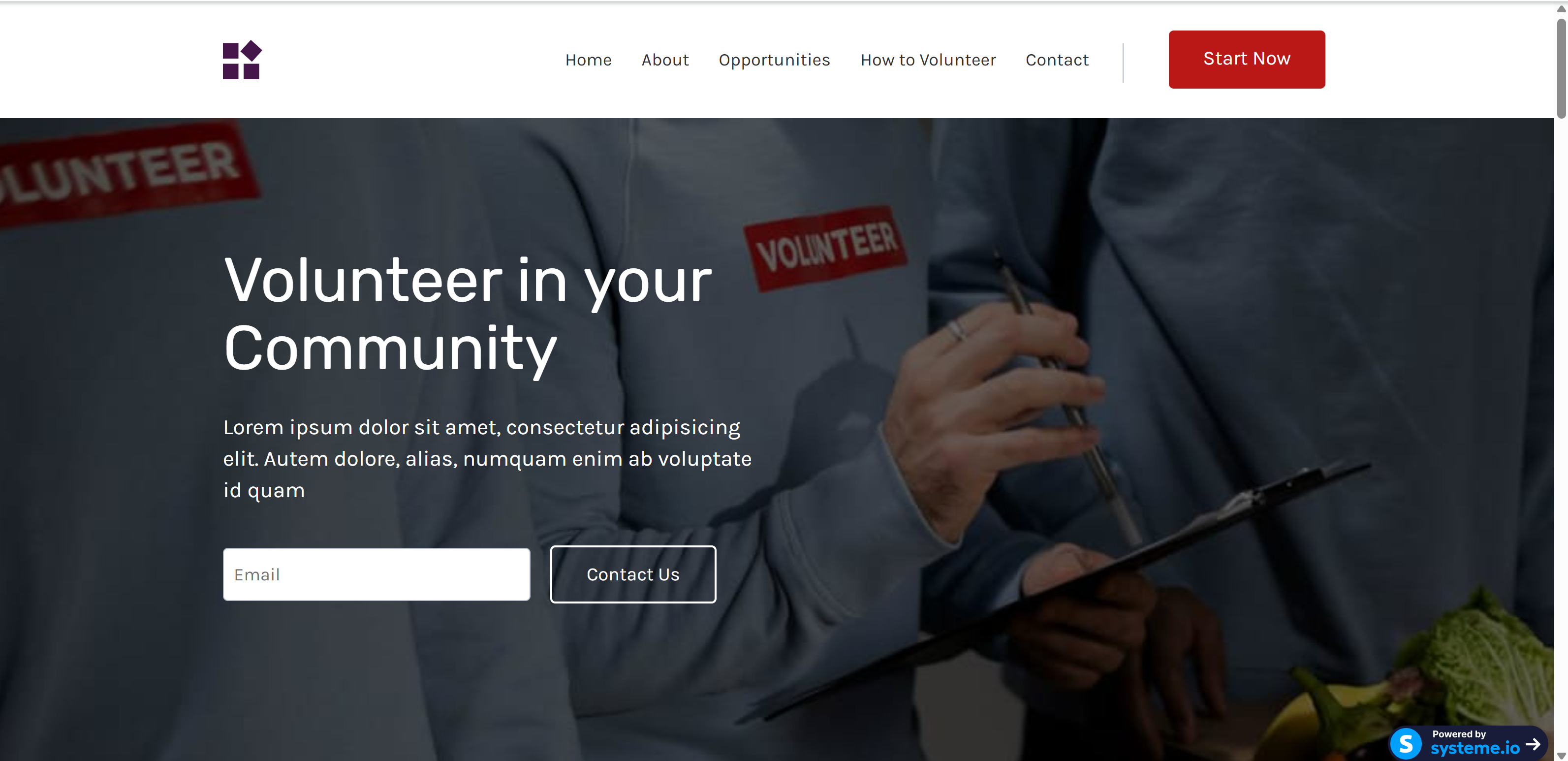
Look carefully at that screenshot: my first "published" page was still showing the template's demo copy ("Volunteer in your Community") and placeholder text. Systeme.io templates are demo pages, not skeletons. Every block arrives pre-filled, and publishing does not warn you. Walk every single section and replace the text before you hit publish — and if you already published, delete the leftover sections in the editor and re-publish.
Step 4 — Build the Thank-you / delivery page
The second step is already created for you. Put the actual deliverable here as well as in the email (people lose emails, and a download link on the page reduces support pings). Keep it to a headline, the download button, and one line telling them what to expect next.
Step 5 — Create the email that delivers the promise
Go to Emails → Campaigns → Create and name the sequence (e.g. Tool Stack Welcome).
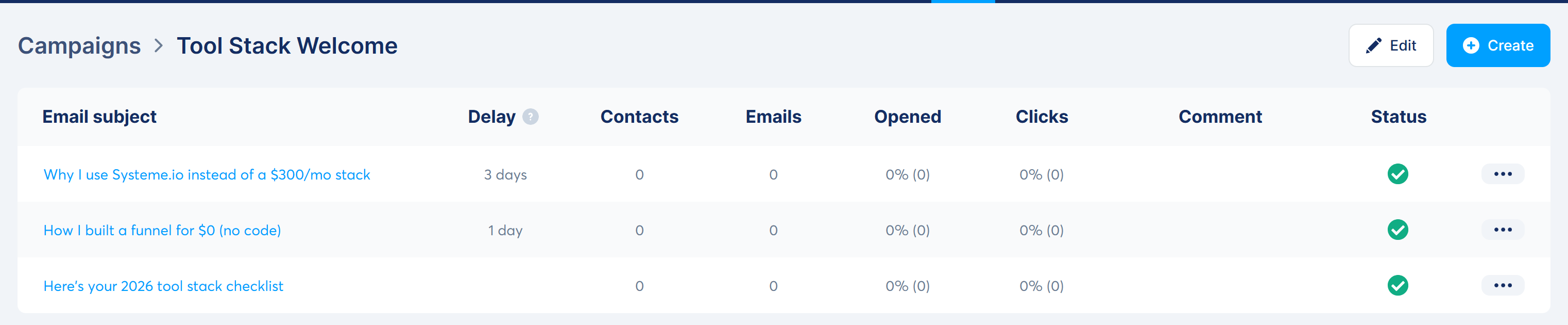
Inside the campaign, create three emails: the first with no delay, the second at +1 day, the third at +3 days. Attach your PDF to email 1 from the right-hand panel.
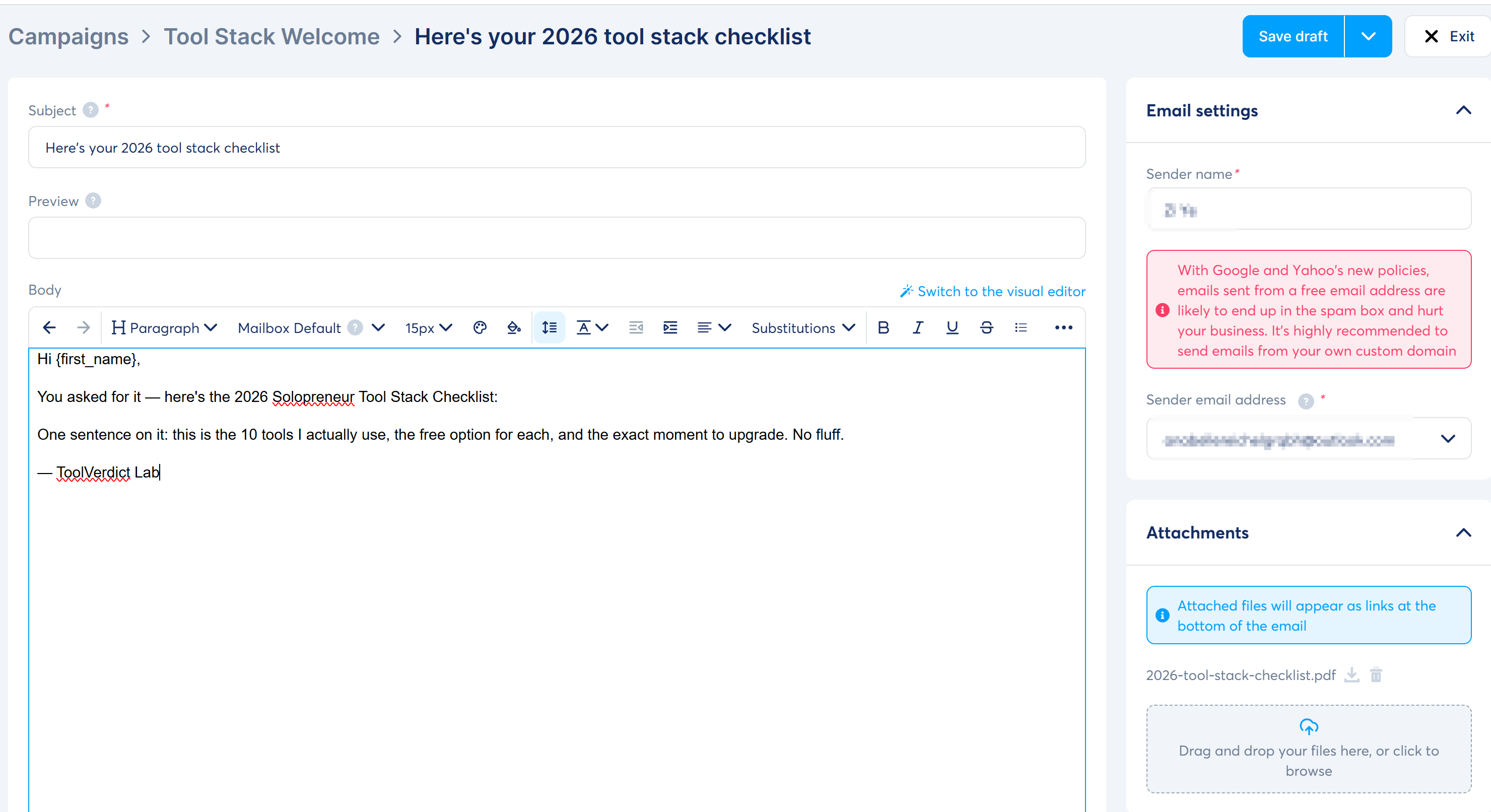
Two things to fix while you are here: the email body also ships with demo content (a fake banner and a "JOHN DOE" signature — delete both), and you should set a real sender name now rather than later.
Step 6 — Wire the automation rule
This is the step that actually connects the page to the emails. Go to Automations → Rules → Create:
- Trigger: Funnel step form subscribed → select your opt-in page
- Action: Subscribe to campaign → select the campaign you just built
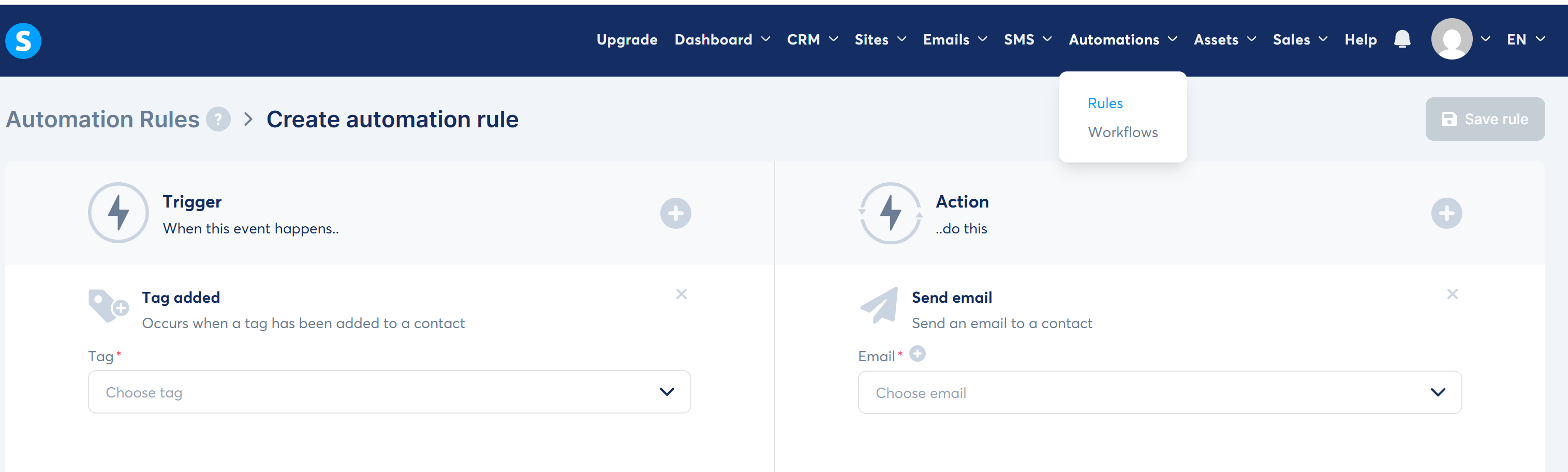
Gotcha: the rule will not save while any trigger/action field is still empty — Save simply stays greyed out. It looks broken the first time; it is a validation quirk.
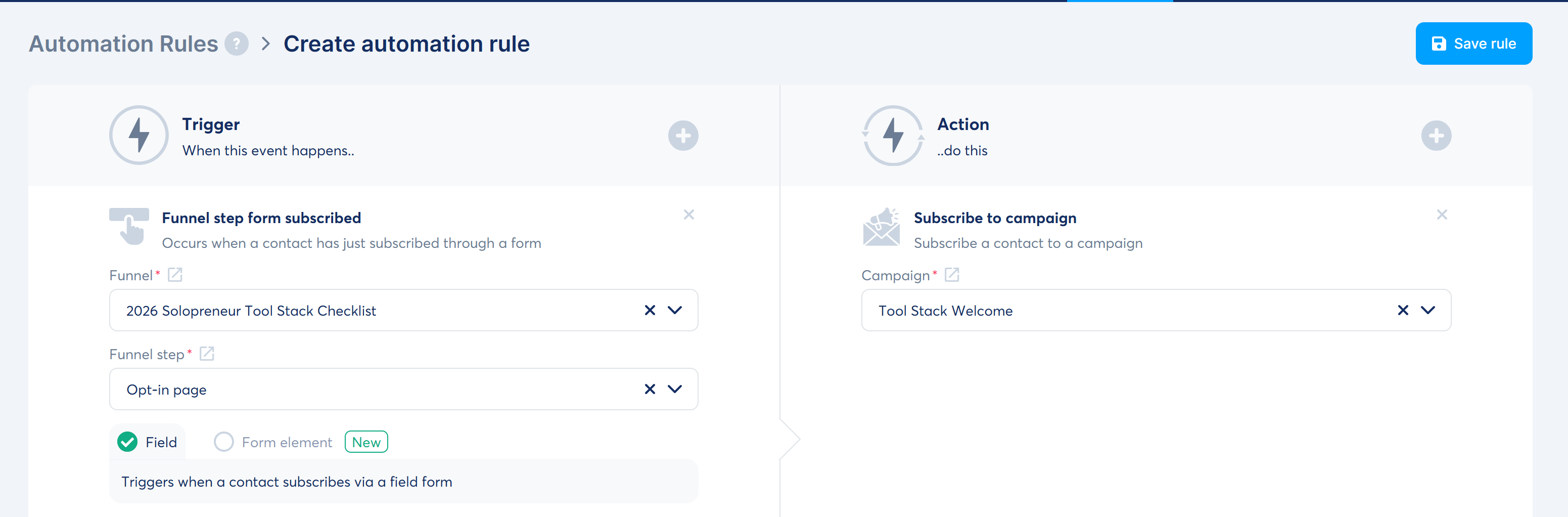
Some page templates also expose a campaign dropdown directly in the form settings, which lets you skip the rule entirely. Check there first — if the option exists, use it.
Step 7 — Send a real test, to a real inbox
Do not trust the preview. Subscribe through your own funnel form with a second email address and confirm the whole chain fires.
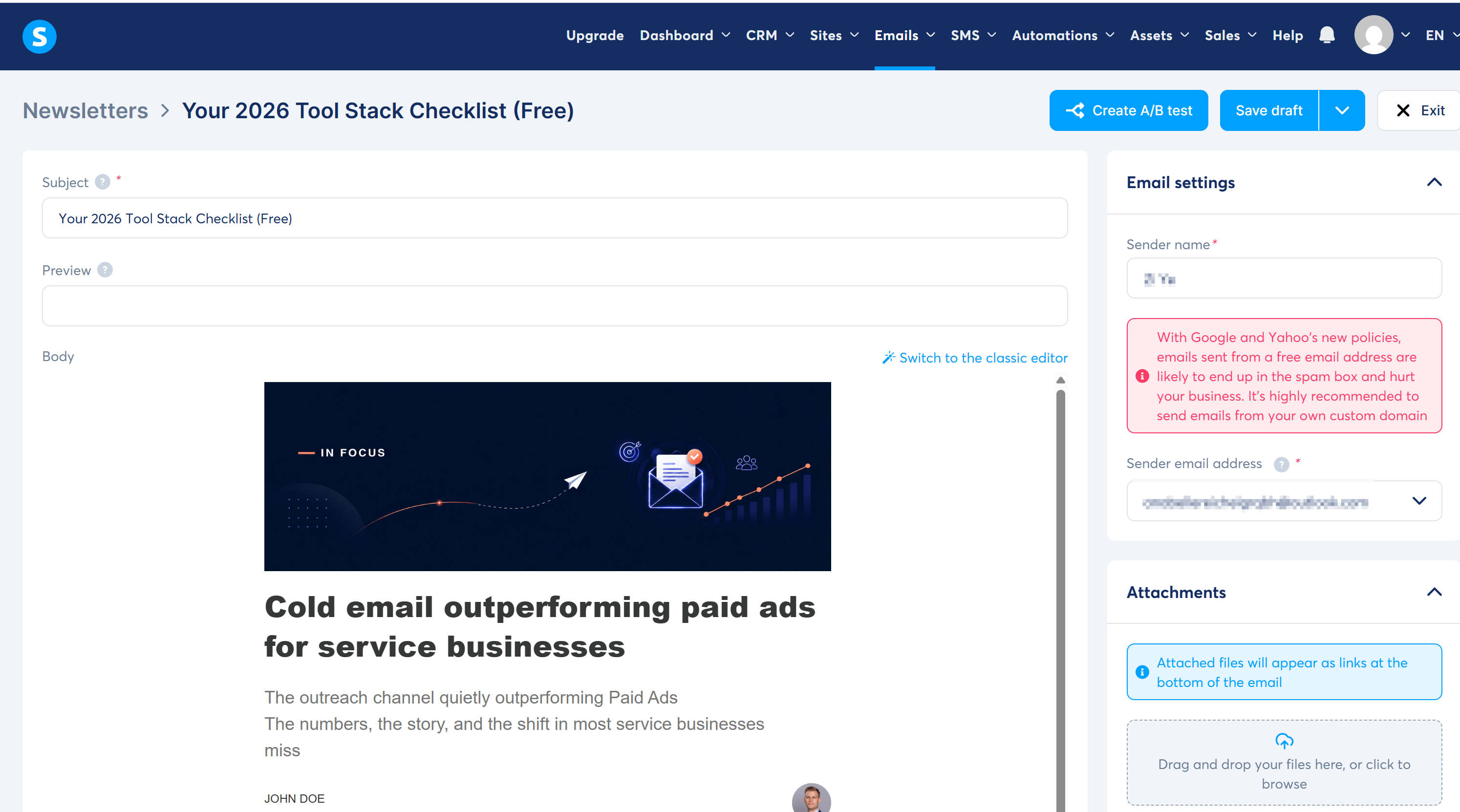
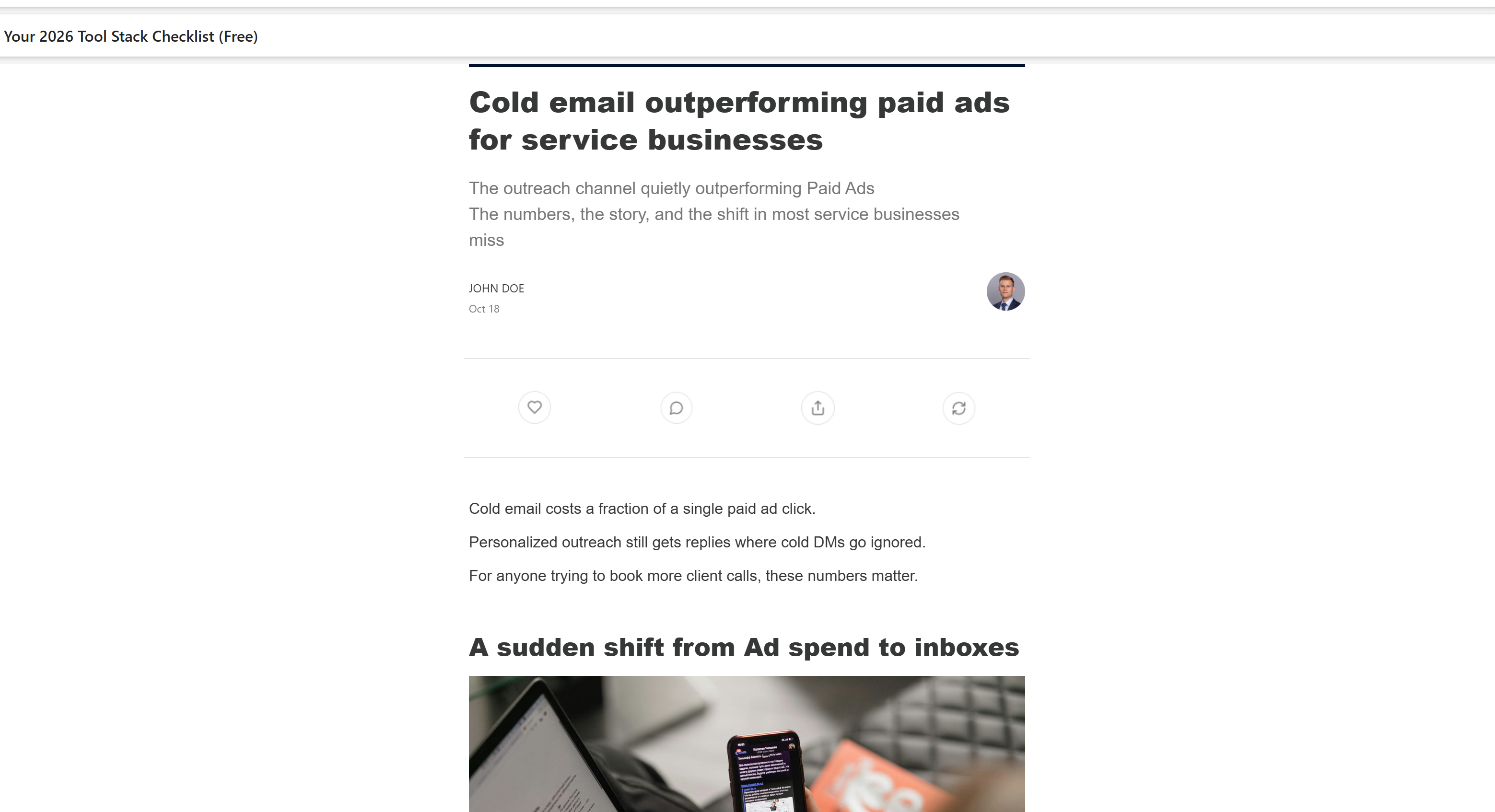
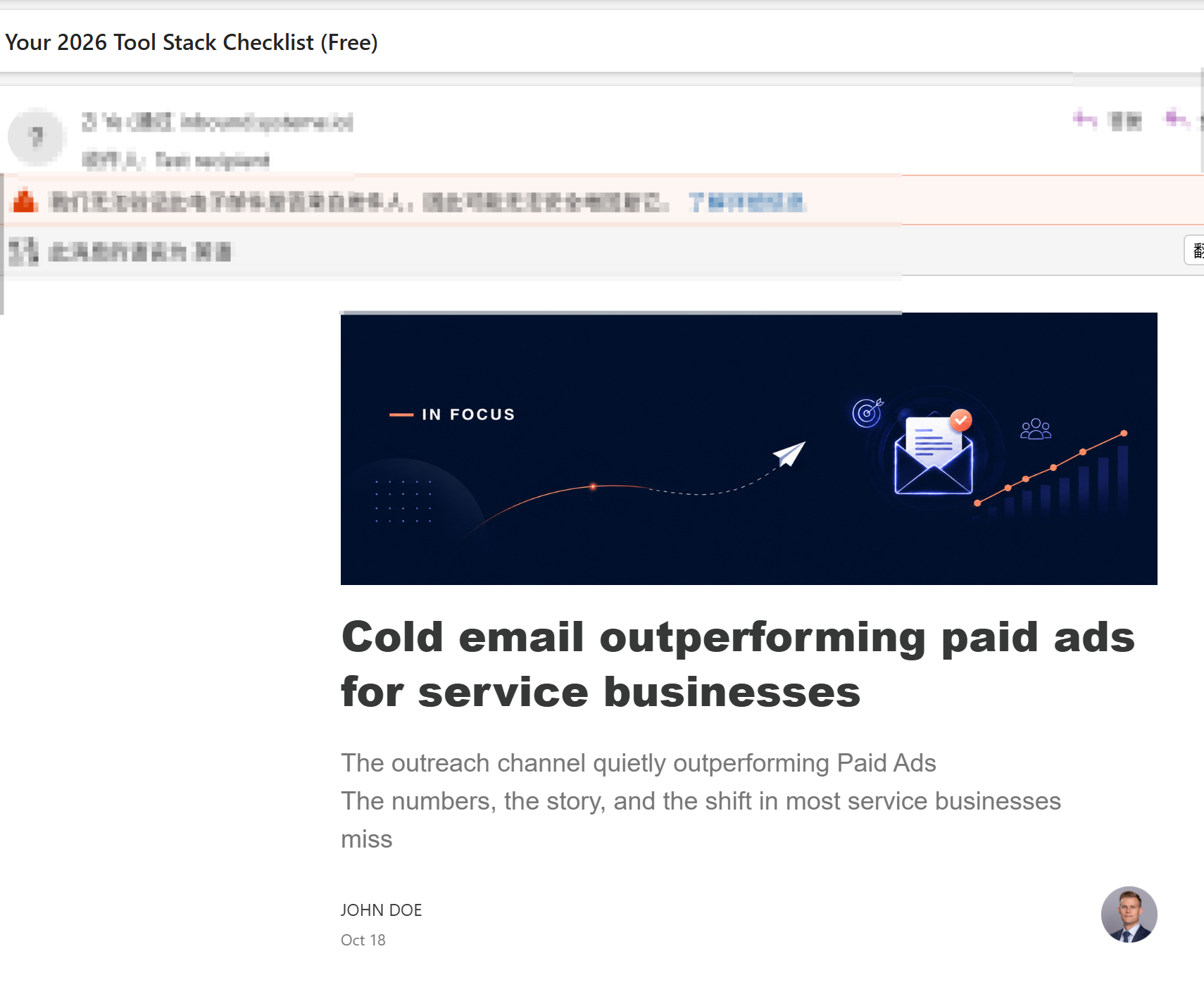
In my test the email landed in the inbox (not spam) without a custom domain configured, and the PDF attachment arrived. That is the happy path — but read the next section before you scale it.
The one thing that will bite you: Gmail/Yahoo senders are blocked
Systeme.io now blocks free-mail senders (Gmail, Yahoo) or lets them get spam-flagged, because of the 2024+ bulk-sender rules the mailbox providers enforce. This is genuinely annoying mid-build and it is also the platform protecting your sender reputation.
Fix: connect your own domain. The free plan includes 1 custom domain (Settings → Custom domains), and it takes one CNAME record. Do this before you send to anyone but yourself. A funnel that collects 200 emails and gets auto-filed to spam has negative value.
Step 8 — Publish, then point traffic at it
The funnel is useless without traffic, and traffic is the part no builder sells you. The cheapest reliable sources for a brand-new funnel:
- One blog post or video per week that answers a real question, with the funnel linked where the answer naturally ends.
- Answer questions where your audience already is (Reddit, niche forums, LinkedIn) and link only when the resource is genuinely the answer — never as a drive-by drop.
- Your email signature and social bio. Free, permanent, compounds.
Track two numbers only for the first month: opt-in page conversion rate and email open rate on email 1. If conversion is under ~20% the problem is the page (offer clarity, headline, or the fact that the promise is vague). If open rate on email 1 is under ~40% the problem is deliverability — go back and connect the domain.
Where the free plan actually stops
Being straight with you, because a guide that pretends there is no ceiling wastes your time:
- No meaningful split-testing on the low tiers. You will be guessing at headlines.
- Automation is rule-based, not visual-branching. Fine for this funnel; limiting once you want "if they clicked but didn't buy, do X."
- 2,000 contacts. A good problem to have — but it is a hard wall.
- Events/webinars and advanced course features sit on the $47+ tiers.
For validating a first offer, none of that matters. If you are already at 5,000 contacts with a working funnel, you have outgrown this guide and should be comparing paid tiers, not free ones.
FAQ
Can I really build a sales funnel for free?
Yes. The funnel in this guide — opt-in page, thank-you page, email campaign and automation rule — was built and tested on Systeme.io's free plan without entering payment details. The only genuine constraint worth planning around is the 2,000-contact ceiling and the need to connect your own domain for deliverability.
How long does this take?
About 30 minutes for the build itself, assuming you already have your lead magnet written. Most of that time went into replacing template demo content, not into configuring anything.
Do I need a custom domain?
Not to build it, but yes before you send to real subscribers. Systeme.io blocks or spam-flags free-mail senders (Gmail, Yahoo) under current provider rules, and the free plan includes one custom domain.
What is the best free funnel builder?
For a $0 all-in-one build (funnel + email + course + automation in one account), Systeme.io is the one I tested end to end. See our full funnel builder comparison for how it stacks up against the paid options.
How many funnel steps do I actually need?
For a lead magnet, two: opt-in page and thank-you/delivery page. A third sales-page step only earns its place once you have something to sell.
Why did my published page show text I never wrote?
Because templates ship as fully populated demo pages, not as empty skeletons. Replace every block before publishing — and if you have already published, delete the leftover sections and re-publish.
I'm an affiliate of Systeme.io: if you sign up through my links, I may earn a commission at no extra cost to you. I only recommend tools I have actually registered and built with — the funnel, emails and screenshots in this guide are from my own working account.
Start your funnel free (no credit card) → systeme.io
Grab the free checklist (2026 Solopreneur Tool Stack: 10 tools, free tiers, and upgrade moments) → Get the free checklist
Related reading: Systeme.io Review 2026 · Best Funnel Builders for Solopreneurs · ClickFunnels Alternatives · The 2026 Solopreneur Tool Stack Checklist